
Cybersecurity – Secure by Design

When the Firefinch team build software for our clients, we know that they need security to be taken seriously – whether the software is for a high-risk medical device or a biotech lab instrument. The product owners will often enlist a cybersecurity consultancy to test their product – and you can read about what this entails in this partner blog by Lorit Consultancy.
The cybersecurity consultancies will assess inherent risks in your product, but they cannot help you fix them. It is therefore very important that you build software with security in mind at every step. In this way we can mitigate risks before they occur and build a safe product from the start.
Secure by Design
Secure by Design is a principle for building technology which aims to minimise security risk. This is not a single rigid methodology, but a collection of fundamental concepts outlined below. These should be applied within whatever core approach is taken to software development.
1. Apply security as a design constraint
All stages of software planning and development should mandate security as a first-class requirement which must be upheld.
2. Assign responsibility
It should be clear who in your organisation is accountable for management of risks, and these people should have the appropriate skills, experience and resources to take the lead in these activities.
3. Expect vulnerabilities
It should be accepted that security incidents will occur during a software lifetime. This means proactive integration of monitoring, logging and alert systems to be able to detect, identify and respond to incidents when they arise.
4. Design flexible architecture
Software should be designed so that it is flexible to change, allowing for security features to be added or modified in response to evolving requirements or new security risks.
5. Only use secure technologies
When integrating third-party software, assess the security of the product and be conscious of the trade-off between the functionality being provided and the risks this product could bring with it.
6. Defence in depth
System design should make use of layered security systems so that failure of a single security feature does not act as a single point of failure in the entire system. This may include for example limiting the scope of access tokens, the use of redundant safety features, and watchdog services ensuring your security features are active.
7. Reduce attack surfaces
Each component in your system should both display and use the minimum functionality it needs – e.g. ensuring as few public-facing APIs as possible are visible, but also that internal components have minimal access to one another.
8. Constant assurance
Security systems should be constantly tested and improved throughout the software lifecycle to provide confidence to risk owners that their mitigations are present.
When developing a .NET solution, you can integrate NuGetAudit within your build pipeline to highlight packages with known vulnerabilities. This would provide a starting point towards constant assurance with respect to use of secure technologies.
Detailed instructions for configuration are available here.
UX design to minimise risk
A well-designed user interface will guide a user through the software, with appropriate use of instructional images and text which speaks to them in their familiar language. UX design is the process of achieving this and involves developing an understanding of the user and the problems that they need software to solve for them.
UX design is thus involves an iterative approach of user research, proposing solutions, and evaluation against requirements. By including risk awareness and mitigation within this cycle we can ensure that the end-product upholds user and security needs. This is as opposed to reworking for security later, which in a worst-case scenario may diminish or undermine the end-user’s experience.
Third-party software for security
Earlier, we highlighted that incorporation of third-party software is a balance of risk to functionality. When it comes to implementing security features themselves, this balance very often leans in favour of third-party solutions.
As an example, consider passwords: for security all passwords must be encrypted before being stored, and there are many off-the-shelf libraries providing the encryption algorithms required to do so (e.g. Argonid, scrypt, bcrypt). Using an appropriate, well-maintained library for these complex algorithms will likely have much lesser risk compared to writing the code yourself.
While the inclusion of third-party software presents risks which should be assessed and managed – it can, and should, be used when appropriate to reduce the risks associated with implementing software solutions in-house.
Good software development practices
Many risks in software development are low-level and so risk management should extend into the day-to-day activities of your developers.
1. Code reviews
It is common practice that every change to a codebase is checked over by at least one other member of the development team; to validate it meets requirements and does not introduce bugs. These can be enhanced by a set of standards agreed upon by the team which encourage the identification and mitigation of risks within each code review.
2. Static analysis tools
Make use of automated tools which identify common programming mistakes, for example dereferencing null, division by zero. This is especially relevant for low-level languages like C and C++ with many exploitable risks associated with them and may be less relevant for newer languages which were designed to eliminate these.
The .NET ecosystem has a range of tools available for static analysis, such as:
- .NET analyzers are part of the compiler platform, which can be expanded with custom-written and/or third-party analyzers
- JetBrains ReSharper command line tools provide an extensive set of .NET focussed inspections that can be integrated with CI/CD pipelines
- Many SaaS platforms (e.g. SonarQube, Aikido Security) include static analysis integrations
These approaches can be combined as necessary to give greater depth of coverage.
Further, we would usually recommend enabling ‘Treat Warnings as Errors’ so that potential issues must be addressed proactively by developers.
3. Vulnerability scanners
Software should be regularly scanned for common vulnerabilities (e.g. OWASP) or known vulnerabilities (e.g. CVE), and this output should be regularly reviewed. This works best when integrated as an automated task which scans the codebase and third-party dependencies using a vulnerability tool to provide a report to the team and any other necessary parties.
4. Automate formatting
Incorrect or inconsistent formatting of source code can increase the mental load on the developer reading the code, and makes bugs like the following easy to miss in a codebase:
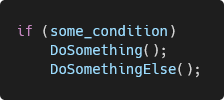
This is solvable by use of formatting software which rearranges code according to rules configured by the team. This could format the above code as follows, where it is more apparent that the second function is always going to be called:
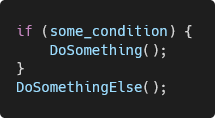
If an EditorConfig file is added to a .NET solution, adding the rules below to the file will instruct .NET to raise a compiler error on build, forcing this issue to be fixed during development.
csharp_prefer_braces = true
dotnet_diagnostic.IDE0011.severity = error
🖱️ Firefinch specialises in compliant medical device software development with deep expertise in regulatory requirements, quality systems, and development best practices.